Showing posts with label Google AdSense tips. Show all posts

Friday, July 14, 2017

How to Withdraw Money From Google Adsense

It can prove quite exciting to watch the money roll into your Google Adsense account from the ads that companies have placed on your website, especially since the income involves no immediate effort on your part. To make use of those earnings, you can withdraw them and transfer to a bank account.

1. Sign in to your Google Adsense account to display the Adsense homepage.
2. Choose the “Home” tab if it is not already selected, and then click “Payment Settings” to show the Payment Settings screen.
3. Click the “Add New Bank Account” button to display the Add New Form of Payment screen.
4. Enter the requested bank account information, including the account holder name, the bank routing number and the account number.
5. Click the “Save” button to save your changes.
6. Wait up to five days for Google to deposit a test amount into your bank account, which can range from 15 cents to $1.10. Note the exact amount.
7. Sign in to Google Adsense once more, click “Payments” and then “Payment Settings” to show the Payment Settings screen.
8. Click “Verify Test Deposit” and enter the test amount that you noted. Then click the “Submit” button, which verifies your account. When the deposits into your Google Adsense account reach the payment threshold, which is $100 in the United States as of June 2013, the money is automatically withdrawn once a month to your bank account.

How to Erase Low CPC Advertisers From Google AdSense

Google Ad Sense can be a great way to create an advertising network through your company's website. This advertising network would be related to your services or products and earn advertising revenue while increasing your target audience. Users who click the ads will generate income for you, either through browsing or purchasing. However, you my want to tailor the types of advertising that appear on your site more toward your target audience by blocking or deleting ad entries. You only want advertisers that correlate with your client base and that maintain high cost-per-click revenue generation. Although you cannot erase advertisers from Google Ad Sense, you can block their ads from your site.

1. Log in to your Google Ad Sense account.
2. Click on the "Allow and Block Ads" tab.
3. Navigate your browser to the Google Keyword Research tool (see Resources). Research a few keywords to determine which ads, associated with which low-performing keywords, you might want to block.
4. Select "General Categories" from the menu on the left, and select what categories to block. This presents you with categories and specific subcategories you can select to block all ads associated with the categories. If a particular ad group performs low on your site, you can eliminate it through this option.
5. Click the "Ad Networks" menu and select any advertising groups associated with poor cost-per-click or keyword visibility to block them.
6. Click the "Advertiser URLs" menu and enter the full URL of any site that advertises poorly with low CPC, or is associated with low keyword visibility. Click the "Block URLs" button to block these URLs.

How to Use AdSense Code on Multiple Websites To Earn More

AdSense is a Google program for website publishers who want to earn advertising revenue on their websites. Once you have been approved for a Google AdSense account, you can use that account to publish ads on any of your business or personal websites, provided those sites adhere to Google AdSense terms and conditions. Although it's not mandatory, adding a Uniform Resource Locator (URL) Channel to your AdSense account for each website will make it easier to track your advertising revenue. You can also use Custom Channels to group your ads by design or location across multiple websites.

Adding URL Channels

1. Open a new browser window and log in to your Google AdSense account. Click the "My Ads" tab at the top of the page.
2. Select "URL Channels" from the Content section of the left menu.
3. Click the "New URL Channel" button. A new window opens.
4. Type the URL of each of your websites into the text box, placing each on a separate line. You can add up to 500 URLs. Click the "Add URL Channels" button when you are finished adding your websites. Once you have placed your ads on these websites, your AdSense report will break down the number of impressions, clicks and revenue received for each website.

Adding Custom Channels

1. Select "Custom Channels" from the Content section of the left menu if you want to track groups of ads on one website or across multiple websites. For example, you can use a channel for all banner ads, all ads on pages with similar content, or all ads of the same color scheme, etc.
2. Click the "New Custom Channel" button. Type a name for the channel in the "Name" field. Select any ad units you have already created from the list to add them to the channel.
3. Click the "Save" button. You can create up to 500 custom channels. Once you have added ads to a channel, your AdSense report will display the impressions, clicks and revenue for each Custom Channel.

Adding Ad Units

1. Click the "Ad Units" link in the Content section of your AdSense page.
2. Click the "New Ad Unit" button at the top of the page.
3. Type a name for the ad unit in the "Name" text field to help you identify this ad from others you create.
4. Click the "Ad Size" menu to select a size for the ad. Click the "Ad Type" menu to select text ads, image/rich media ads or both.
5. Select one or more custom channels for the ad unit if desired.
6. Configure the style of your ad by selecting one of the displayed styles or by clicking "Use Custom Settings" to define your own style.
7. Click the "Save and Get Code" button.
8. Copy the code provided and paste it where desired on any page of your websites that conforms to the Google AdSense terms, conditions and policies.

Warning

  • Review the Google AdSense Terms and Conditions and the AdSense Program Policies before placing ads on a new website. For example, each website must have a Privacy Policy statement, cannot display pornography or promote alcohol or firearms, etc. If any website violates Google's terms, your account may be terminated.

How to Activate Google AdSense

Google AdSense enables you to display text and visual ads on your website. Through the program, page visits and ad clicks result in income to you. You can easily setup a Google AdSense account, but there are multiple steps before you can activate it and receive your earnings. Once you complete the activation, you can connect a bank account to Google AdSense and automatically receive your funds.

Account Setup

Sign up with Google AdSense through the official website (link in Resources). Before you can receive the ads on your website, you must have a completed Web page that Google can visit and approve. After signing up, verify your email address immediately. If you wait to verify your email address, the application won't get reviewed right away. Check your email every couple of days until Google has confirmed your account and application. Once it does, you can log in to the AdSense website.

Bank Verification

Once the account is set up, you need to verify your bank account. Click on the "Payments" tab and select "Payment Settings." Enter a checking account including the account number and routing number. Google will verify this by depositing a small amount into your account. Check your online balance or bank statements to find this amount. It may take up to two weeks before it's applied on your account. Once deposited, click on the "Verify Bank Account" link. Enter the amount, confirm it and your payment settings will be confirmed.

Tax Information

Google requires tax information to activate your account. Click on the "Tax" link at the top of the Payments page. Fill out the digital W-9 form that includes all your personal information. Type your name in the bottom box to confirm your digital signature. If you're uncomfortable giving this personal information online, go to the top of the page and click the "Print Form." Print it out and follow the mailing instructions.


Phone Call Verification

The final step in activating a Google AdSense account is through phone call verification. This process ensures that you have a legitimate phone number and Google can contact you if needed. Click on the "Verify Phone Number" link. Verify the correct phone number is listed and then press "Call Now." When you answer the phone, there will be a digital recording with a verification number. Enter that number in the box and press "Submit Phone Verification." Once complete, the account will be fully activated.

Thursday, July 13, 2017

7 Google AdSense Tips With Great Results

Google AdSense is one of the easiest ways to make money online. When you’re creating a site in a good niche, you can add Google AdSense to the pages for a little extra income.

Since you are working within a niche, Google AdSense will scour your content and give you ads that are specific to your keywords. This is great for having ads on your site that are constant updated without maintenance. If you are ready to start making a little extra incomefrom your website, there are a few things you need to know. Adsense can be extremely powerful when implemented correctly.
Here are some easy Adsense tips that will give you great results.


1. Use Better Keywords

Effective Keywords are the bread and butter of Google Adsense earnings. If you’re using highly competitive keywords you’re not going to rank as well as if you were using lower competitive keywords. The Google AdWords keyword planner is a great tool for finding low competition keywords for your articles and blog posts.

2. Have Proper Keyword Density

Check your keyword density before you post an article onto your website or blog. Your keyword density is going to determine the relevance to your niche and will improve your trafficin the search engines. It’s pretty much a given that when you have more traffic you’re going to get more clicks.
However, your keyword density is also going to determine the kinds of advertising is posted onto your site. There is nothing worse than having a niche site for toddles and having an Adsense ad that has to do with body cream.
Use a keyword density tool so your post isn’t marked as spam. This will also help you in the even that you need to boost the density.

3. Publish New Content Regularly

Writing new content every day is not some great revelation, but it is proven to generate traffic to your website. Make sure that you are using the best keywords and the best keyword density in your posts. Try to post a new page to your website every day. When you post a new page you are increasing the chances that somebody will click on your ads.

4. Choose The Best Formats

Google Adsense comes in a lot of different formats. When you’re choosing the format for your blog or website, you want to use the banners for the top part of your website and the squares for the sides. In my opinion, the best formats are the 336×280 large rectangle ads, 160×600 skyscraper ads and the 300×250 medium rectangle ads.

5. Color Coordinate The Ads

When you’re using Google AdSense with your website, you want to make sure that the ads look like they are part of the site. People are more likely to click on something that doesn’t look like an ad. You want to make it look like they are clicking on a link that will take them to a different page on your site.
Make sure that the border colors, the background colors, link colors and the text colors all match your site. You can do this through the control panel. You can even rotate the color palettes to make create a variety of colors when somebody visits your site.

6. Position The Ads Well

The position that your ads are in is very important to getting clicks. When somebody comes to your website, they scan the headlines to see if the information is relevant to their search. Using the links as navigational links around your website is one of the best methods of positioning.
Put your links at the top and bottom of the content pages instead of on the side. Remember that you want the links to look like they’re part of your site. When you position them between at the top and bottom of your content pages you are more likely to get clicks.

7. Don’t Use Too Many Ads

You can go overboard with your ads. Having too much advertising on your website will leave the reader wondering what they need to click for information. This can also look like spamming, something that you never want to do.
Readers are humans and they don’t want a website that is specifically made for Google AdSense. They are there for your content so make sure that the content comes before the ads. Two to three ads on your site is the best amount to have.

Saturday, July 8, 2017

How to Convert AdSense Hosted to Non-hosted Account

Before few year Google Adsens change his policy for Adsense account approval. They give different type of account; hosted account for google product and non-hosted account for publisher own wesbites.


AdSense hosted account is the one that is approved by partner sites of Google such as Blogspot, YouTube or HubPages.
AdSense non-hosted account is the one which you can use on any website that you own even if your account is on domains like .com, .net or .org.

Steps to Convert AdSense Hosted to Non-hosted Account

  • Sign into your AdSense account.
  • On the top right, you will see the gear icon. Click that and select settings.
  • On the left side select Site Access and authorization section and select Site authorization.
  • On the Show ads on other websites page that appears, enter the URL of the site where you plan to show ads.
  • Click Submit.

Add AdSense code to your website

  • Sign into your AdSense account. Now visit the My ads tab.
  • From the sidebar, choose Content.
  • Click +New ad unit button.
  • In the next step enter the name of your ad and customize it.
  • View details about the settings.
  • Click Save and get the code.

What to do if your application is disapproved ?

After few days You get an email about approval or disapproval your request. Even if your application is rejected, don't worry. You will be able to use Adsense on hosted sites like Blogspot or Youtube. You can always try again and again until you get approved.

Sunday, April 9, 2017

Best Adsense Ad Optimized Wordpress Theme To Boost Your Adsense Earning

Is that right?
Well, AdSense is an excellent way to make money online. However, to earn money from AdSense, you need to optimize things like ad placement, ad color & lots of other things.
You can always use any of these AdSense WordPress plugins, but there are many dedicated premium WordPress themes which help in increasing AdSense revenue.
These themes are created specifically to get a higher CTR on your ads and make sure your content is generating the highest paying ads.
I have created a collection of the best AdSense WordPress themes which you can use right now.
These themes come with strategic ad locations and lots of other subtle optimizations to make your website more suitable for displaying ads.
I will introduce you to the 11 best WordPress themes which are professionally optimized for AdSense. Go through the list one by one and find out which theme is the perfect fit for you.

Best Premium WordPress Adsense Themes For Higher Earning:

This is one of the newest & best AdSense WordPress themes to earn more from your ads. This theme comes with many advanced features which are very unique.
One of these features is an anti-adblocker technique that shows a pop-up to any visitor who has an ad-blocker add-on installed. It then asks the user to disable their ad-blocker for your blog.
The ad-blocker feature can be configured in many ways including the option to hide a single post’s content or simply showing a warning using a flyout.
This one theme comes with 8 beautiful, pre-defined layouts that you can use for a specific kind of niche blog.
  1. Tech blog
  2. Fashion blog
  3. Food blog
  4. Sports blog
  5. Baby blog
  6. Fitness blog
  7. News blog
  8. Online shopping blog
ad-placement
If you are looking for a theme that will help you generate more revenue from AdSense, this is the best WordPress theme for AdSense bloggers.
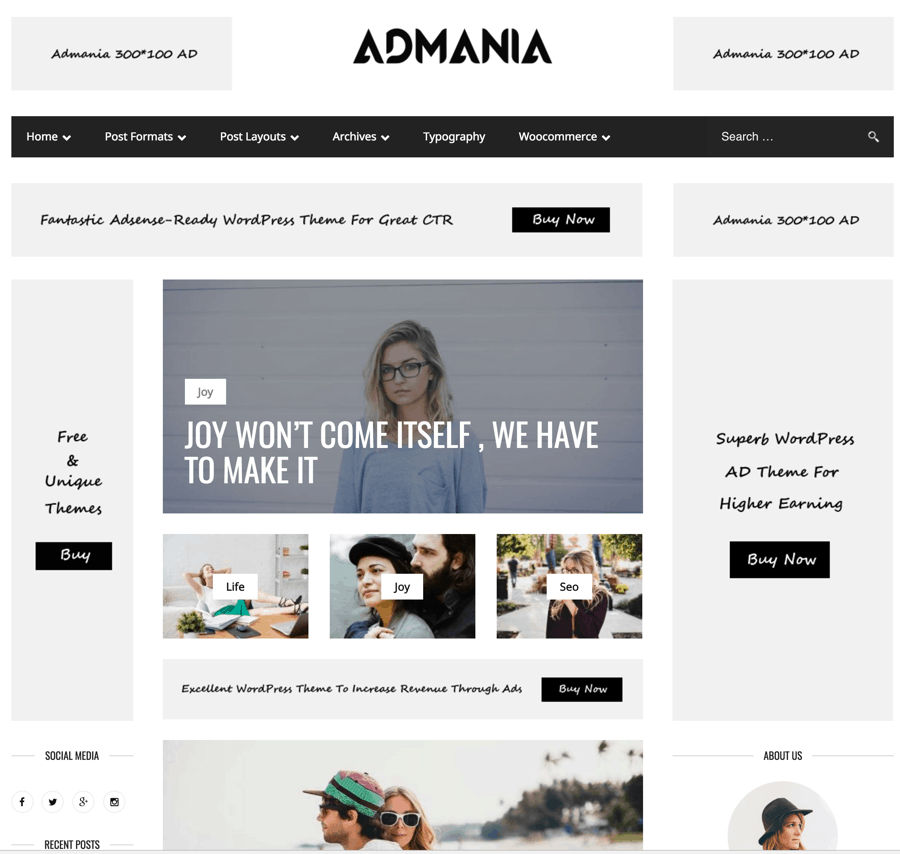
With over 241 sales on ThemeForest & an average rating of 5/5 Admania is one of the finest AdSense ready WordPress themes. This theme is appropriate for bloggers who are monetizing their blog with AdSense or any other contextual ad. One of the challenges that I have faced when adding AdSense to a WordPress blog is the option to add ads on the homepage.
Admania let you use the live editor to place the ad on the homepage. For example, if you wish to add ads between two posts on the homepage or on the sidebar, you can do that within seconds. This theme offers three different layouts to customize your homepage. Especially if you are creating multiple blogs, this one theme will give a unique identity to each of them.
What really interesting here is; you can add ad codes without any plugin. The theme ad panel is advanced & user-friendly. Apart from being AdSense friendly, Admania also have schema markup which is important SEO signals & is one of the fastest loading WordPress theme in the lot. The theme cost only $44 & developer support is already praised by existing buyers.
Truemag
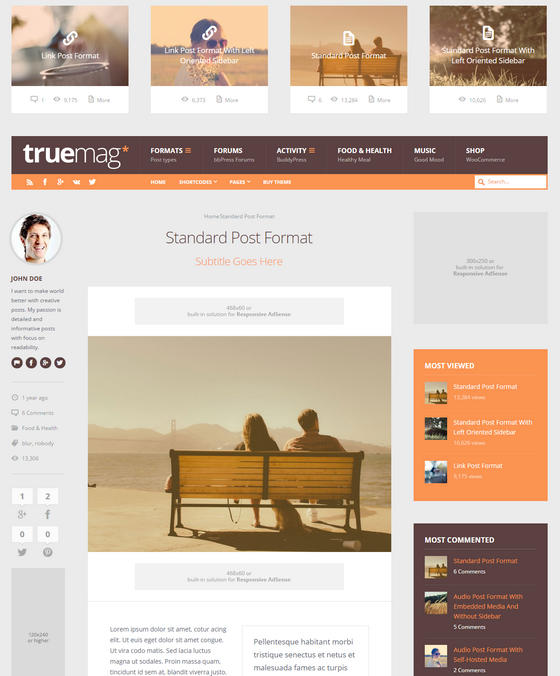
With a strong focus on monetization, Truemag is an excellent WordPress theme with a complete AdSense optimization. The different advertisement areas are located in various strategic hotspots which blend perfectly with the overall website design.
Besides the sidebar on the front page, there are several ad locations in the blog posts too.
The built-in AdSense ad units are completely responsive. That means your ads will be visible on all device types. As this retina ready theme comes with WooCommerce integration, you can easily integrate an online shop in your website too. You can also choose a custom layout, color skins, font icons, and unlimited sidebars from the theme’s options section.
Truemag is priced at $58.
Free Adsense WordPress Theme
IsleMag is a popular free WordPress theme which makes it easier for a blogger to monetize with AdSense.
This theme has been downloaded over 3000+ times & is a popular AdSense friendly magazine WordPress theme.
With a responsive design, you will be able to make the most out of your mobile & tablet traffic. However, I recommend you to use responsive AdSense ad units to maximize your AdSense earnings.
If you wish to highlight a specific post on your homepage, take advantage of the in-built Carousel Slider.
The thing I like the most about this theme is how frequently it gets updated to ensure compatibility with the latest version of WordPress.
If you are looking for a free magazine style AdSense WordPress theme, IsleMag is an ideal choice.
Grimag
Grimag is an excellent WordPress magazine theme for editors and publishers.
The theme developers have optimized Grimag for maximum monetization output. The available advertisement locations are strategically positioned to match the overall design. By using this theme, you can display attractive ads and earn a lot of profits from your content.
An interesting feature of Grimag is its fixed sidebar. You can easily display site-wide advertisementsby using the sidebar. The completely responsive layout of this theme makes sure that your website looks great on any screen size.
The retina-ready WordPress theme can be translated into other supported languages too.
The Grimag theme is priced at $48.
TruePixel
Featuring multiple ad locations on the front page, single posts, and pages, TruePixel is another attractive WordPress theme.
Being fully optimized for AdSense, this theme helps you to get a better CTR and CPC from your visitors. The glossy design of TruePixel makes it an excellent choice for creating news, magazine, and entertainment websites.
The fully responsive theme is provided with a large “featured” section which could be used to showcase popular or recent posts. This speed-optimized theme will also load pages quickly, helping you to get better search engine ranking and deliver an improved user experience.
You can get the TruePixel theme for $45.
NewsOnline
The fully responsive NewsOnline theme is provided with a unique mix of style and elegance.
The eye-catching design of this theme lets you attract the attention of your visitors instantly. If you want to display a lot of content on your website and want to make some money from it, this could be an excellent choice for you.
NewsOnline includes cleverly positioned ad spaces which do not distract visitors while making sure that you are getting maximum conversions. This SEO-optimized theme also comes with parallax effects, an off-canvas mobile menu, social media buttons, and lots of shortcodes.
You can get the NewsOnline theme for $45.
GoMedia
If you are looking for a news, magazine, or blog theme with special ad locations, GoMedia could be the perfect choice for you.
By default, the home page contains four ad locations. It is possible to disable any of them and/or add new ad locations in other places of your website.
The advanced control panel of this theme lets you control various settings of your website all from one place. The theme package comes with several custom widgets including Twitter and Flickr. You will also be able to choose from the custom page templates for full width, archive, and other pages.
The GoMedia theme costs $49.
Nominal
If you want a simple WordPress theme for your next blog site which will also show some advertisements, you should definitely consider Nominal as one of your top choices.
The default layout of this theme includes an HTML or image banner right below the menu and on top of the right sidebar. If your blog has sponsors, you can easily show them in the sidebar.
Besides the default ads, you can use the custom widgets to place ads in various locations without having to edit the theme code. This SEO-friendly theme is also optimized for loading your pages in the quickest time possible.
You can get the Nominal theme for $45.
DizzyMag
With a large advertisement location on top of the site and another two ad locations in the home page, DizzyMag is an excellent AdSense-ready magazine, news, or blog theme for WordPress.
The responsive ad units and strategic hot spots will help you to maximize your monetization efforts.
DizzyMag also comes with a full-featured review and ratings system. By using this feature, you can easily publish an in-depth review of your favorite products and/or services. As the theme also supports WooCommerce, you can also include an online shop in your website.
The feature-rich DizzyMag theme is priced at $58.
Goliath
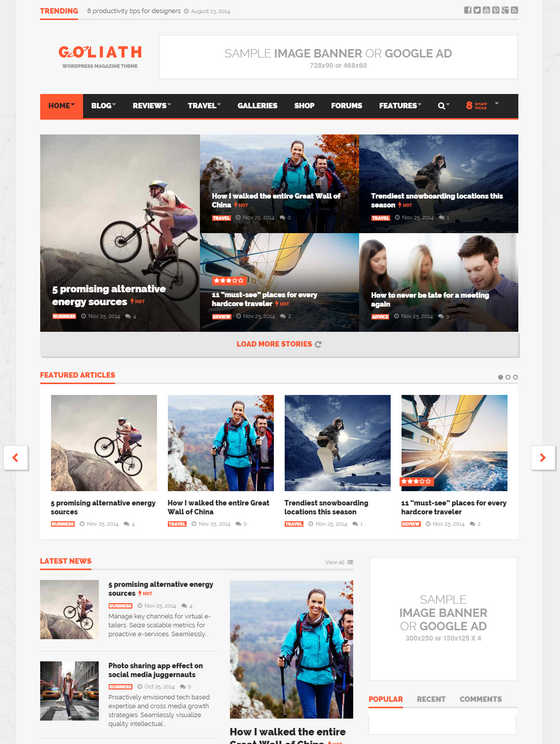
Goliath is a fully responsive ad-optimized WordPress theme for creating beautiful magazine WordPress sites. The integrated control panel lets you display Google AdSense or other ads in three dedicated locations on the home page. As this theme comes with Revolution Slider and Visual Composer, you can easily create eye-catching layouts for your visitors.
The theme package includes a rating system, summary features, and enhanced review display options.
This multi-lingual theme also comes with full WooCommerce and bbPress support. As the theme package includes the PSD files, you can easily customize the look of your website.
You can get the Goliath theme for $58.
12. Flick
Flick
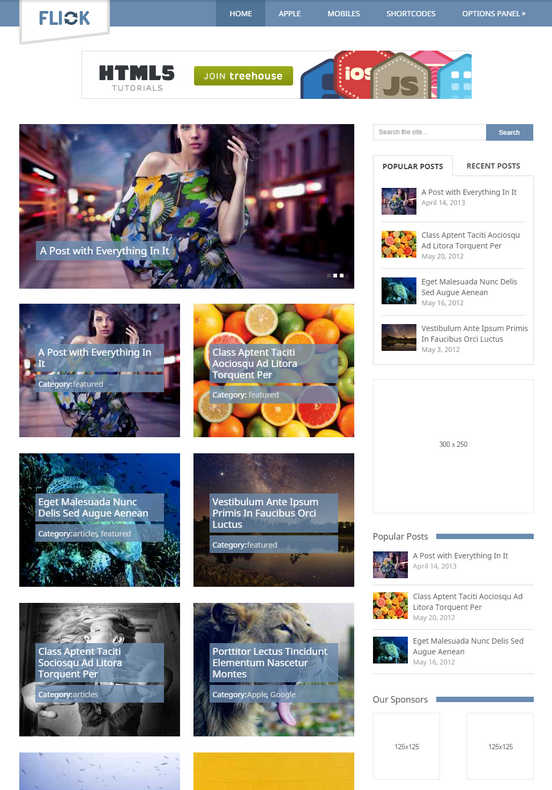
Flick is a minimal, simple WordPress theme for creating blog, personal, or portfolio sites with cleverly positioned ad slots. The top banner, sidebar ad location, and the sponsors section blend perfectly with the overall design. If you are looking for a theme with a strong focus on media, this could be an excellent choice for you.
Based on Twitter’s Bootstrap framework, Flick is a fully responsive and SEO optimized theme for providing your site with maximum search engine exposure. The powerful options panel of this theme lets you customize various settings of your website. You will also find the custom widgets very useful.
You can get the Flick theme for $45.

Which AdSense WordPress theme is right for you?

Now that you have gone through the list of AdSense optimized themes for WordPress, which one(s) do you like the most? Did you find any theme which you are planning to use for your next website?

Friday, April 7, 2017

Top 12 Adsense Ads Violations you Perhaps Doing

Google Adsense is a name of excellent fame holder, you can hear about once you turn on his internet connection. I and you can’t count Google’s services neither pay thank but you just merry making by them. It not only its services free but also valuable for the user. Google deals about all aspects of internet user life considerately there is no corner of his life where its services are not working. So, you can find the highlighted name Google on internet which now became the Hero of internet.
When you going to take part in any game, for this some rules and regulation are imposed on you and you’ve to pursue them at any cost otherwise it is near you fell outside point. By the same way, the same example is of Google Adsense which has some solid terms for the user and he must have follow them before getting for an approved account and afterward also to maintain it stable.
Now, I think you have a question, what are Google Adsense rules and regulation………..?
But, on this time you should wait for some while. It is much better if we talk about Google Adsense platform before, so that newbie may also know what for these terms are.
In the current discussion we’ll call these terms of Google, Adsense Ads Violations. Such as, which are common Adsense Ads Violations mostly user commit and make disable his account.


What is Google Adsense?

So, Adsense is service by Google, the way to make money through his advertisers’ ads for the publishers to displaying ads on their sites. Google launched this platform before many years ago through this platform both of advertiser and publisher show their interest as well Google itself. Adsense program runs on the base of three collaborators Google itself, Advertise and Publisher.
Google (Google handles both of Advertiser and Publisher)
Advertiser (Who make publicity of his product by Publisher)
Publisher (Who promote advertiser’s product on his site and earn revenue in return of)
Google receives ads from advertiser and give to publisher to displaying on his site. When any user clicks on this ad (displayed on publisher site), Google shares 68% of revenue out of total with publisher. So, this process runs through three parties and these all take their own benefit from the system.

Are you really want to make constant money via Adsense?

If you want your Adsense earning should constant and increase, you must take care of its rules and regulation. You should know how much struggle you made to get Adsense account. You spent time, money and other vital essentials on your site and wait for till specific time and then you got approved an account. Can you think your account sudden snatched from you and you stunned. You not bear like these havoc words. If you won an account on Adsense then why are you close his eyes from Adsense violation? You know when Google gave you Adsense account many thing are settled between you and platform. In them the important bet is you remain away from Adsense violation.

Really you want to continue his earning on Google with the ambition your earning increase gradually. You must be take care of Adsense violation policy and run through them. Google not want you not increase your Google Adsense earnings but with fair means so that neither your effort nor advertiser investment go spoil. So, let’s make remember our promise with Adsense and take care of own time and Google advertiser expenses. You should know this bet is only possible when you follow the Adsense policy.

Adsense Ads Violations:

Click Cheat is a wrong banned technique by Adsense Warning Policy. The more your user clicks on Google ads the more you earn extra money. Your earnings ratio is clicking on Google ads. When a click is made by visitor, some amount will be sent to your account.

Unfortunately, some smart guys use banned ways to get maximum clicks and make quick money on Google ads and finally failed to get have Adsense account till long time. Actually, need is this, how can you keep lasting your account or what kind of Click Cheating you need to avoid them which are done by several guys by different tricky ways.
Hence, in this post I’ll make oration on Adsense Ads Violations which are awkward and there is Adsense warning summons by Google Guidelines for them. Furthermore, it is not only most of smart guys make massive click by several illegal means but also they deceive Google through other means as well which cause to happen their Google Adsense earnings increase. To getting understanding of some Adsense Ads Violations ahead are some example related to them which are openly banned by Google.
The important and praise worthy intelligence is you stable your account and remain away from Adsense Ads Violations which Google Adsense outlaw to use. Unfortunately, a big class of Adsense owner make blocked his account by doing Google Adsense Policy Violation. I think most of them may be newbie those yet not know about Google Adsense violation and busy to earn extra money from Google Adsense. So, here is a list of familiar Adsense Ads Violations which are done by smart guys and they finally make blocked their Adsense account.

1: Newbie in Google Adsense:

A man luckily got Google Adsense account but never read its policy and clicks on Google ads itself. He knows only, Google gives an amount when someone clicks on its ads whether he is me or other. He clicking on ads constantly to make quick money but when saw his Google account, received an Email like “Your account has been blocked due to ignoring our Policies terms” he stunned now. I think it was the result of his ignorance from reading Adsense ads warning and now his Adsense account has been disabled.

Definitely, now you are in rainy days but you are own responsible whatever you did. The same thing you will get whatever will bow.
If you are yet new joined Adsense, be aware you have not permit to self click on its ads but only organic click is accepted. Google as well want you extend his earning but remaining in limit. Use organic ways to increase Google Adsense earnings. It’s your right and no one stop you to do this.

2: Using Adsense on Prohibited Content:

Google is name of authentic clear platform thus it’s all networks are performance well according to the interests of internet user. Then why many of peoples are still deceiving to it? I think they consider in this habit, their benefit is. So, listen not till long but just for limited.

Google prevents his user to use Adsense ads on unwanted content so that it should be shunned from any carp and evil as well run out over the world.
It is one of the biggest Adsense ads violations the use of unwanted content with Adsense. I expect you think which kind of content Google have complaint to use? The answer of this thought is not far just move your eye ahead where a list is of Google Adsense ads violations about content you must avoid to use on your site.
  • Adult Content
  • Copyrighted Material
  • Content that advocates against an individual, group, or organization
  • Drug, Alcohol, and Tobacco related content
  • Sales of promotion of prescription drugs
  • Weapon-related content
  • Gambling type content
  • Hacking and Cracking content
  • Counterfeit Goods

3: Click Cheat by Proxy:

To make quick money the Adsense user uses Proxy cheat to make several clicks on Google ads. Proxy is software that connects to internet with different IPs. When Cheater connects Proxy with various countries and IPs, it clicks on Google ads. User realizes that he is ignored by Google and clicks are made with different countries and IPs but definitely he is deceiving only to himself not to Google. He should remember, Google is a big player than him and Google knows his original IP and country through wonderful algorithms.
Golden Words: Google demands only real clicks and expression by publishers’ visitor and he has fantastic tools by using them he traces easily any of cheat. Thus, you can never deceive to Google through your naughty attitude. Therefore, it will be better you work faithfully and don’t use such these cheating applications otherwise you may get wreck.

4: Multi PC Cheat:


Everybody not remain alone in his society, he has many buddies and connecting each other via emailing, visiting, meeting and Social Media etc. Similarly, you can take the help of your buddies to get advantages of anything. Perhaps, it should wrong and considered it is illegal. If talk to Adsense Ads when someone got Adsense account and order to his friends to clicking on Google ads and constantly his friends clicking on these ads. To do this Google account holder consider himself clever than Google, he consider I’m sit hide and this mischief is ignored by Google and I keep on deceiving to Google. But, absolutely it is his misunderstanding and blunder. Google is equipped with fury type algorithms and tools and he detects your tricky job just is tiny one.

5: Click Exchange:

Once anyone got any assert he want to take advantages of it more and more. I think he imagine, how long this assert is his that it is better to take maximum utility from it. However, if he use as its guidelines, he can maintain it long lasting. But, man is known as greedy, what he should do having this habit.

It may you got Adsense account and same you are greedy with it. You want maximum clicks on Adsense ads to extend his earning. Thus, for this you use many techniques good or better, it is in your hands.
According to comprehension of me, most of Adsense accounts are suspended due to fake click on ads; in them a custom of Click Exchange is common seen. When two Adsense account holder make a treaty between to clicking on each other Adsense ads, it is a Click Exchange.
But, for them I’ve a question against if they response argument, are you completely hide from Google eyes and how long you are success by this evil? Definitely they’ve no words. Eventually, they are deceiving each other and nothing louse up to Adsense program.

6: Use of Clickbot:

Developing interest of getting more and more clicks by newbie ignoring Google Adsense Polices and then ready to use of Clickbot technique. Clickbot is a way through software getting auto clicks on Adsense ads. This software scanning your websites pages and after a while begins to clicking on Google ads. Clickbot are found in various advanced versions some of changing IP and clicking to make silly to Google. Some of advanced level Clickbot software also visits site and click with changing IP ID.
His Clickbot technique remains success till less time span and soonest it is capture and terminal by Google forever. Now, where his game gone whereas he considers himself the smartest than Google. He should know nothing is hidden from Google’s eyes and he is enough smarter than you. Nevertheless, Google is spending a time on Adsense to controlling these kinds of deceptive techniques. Really, he knows what is happening among his users and also their tricky behavior whether a click is original or deceptive.

7: Paid Click:

Paid click cheat is a method to getting clicks on paid base. Cheater pays some money from his earning to other peoples or a group of guys and says them to clicking on Google ads continually. They click on his ads especially on expensive ads.

But soonest Google trace this attitude too and send him Adsense ultimate email and his account finally blocked due to not act upon Google term. Now, there is no way for him to get back his account because for such this tricky habit there is no forgiveness.

8: Use of Meaningful Words:

As greedy man gets clicks through various lawless ways in them one is the use of meaningful words near Google expensive ads. Actually, this bad technique is open Adsense Ads Violations and Google trace it easily and an email is sent to account holder that his account is captured due to Adsense Ads Violations.
So, using some of meaningful sentence near Google ads as “Click here for more detail” or “Please visit my sponsor” etc are meaningful cheated words which are open tricky techniques and Google completely stop you to using such kinds of words near Google ads.

9: Using Ads on Copyright Content:

Google demand his user must has his own original content created by himself. But, most of smart guys ignore it and copy others’ original content from others’ site and use on own site. He should know this practice is known as Adsense Ads Violations to displaying ads on copyrighted content stealing from others.

10: Email Letter Cheat:

This is common example seen among Adsense user to get expensive clicks on Google ads through email IDs. You have site with useful content on it and it is ok you gathered bundles of email IDs of his visitor and once new updates happen there on your site by you, your user get to know about via this emailing. Most of Adsense user takes the help of these emails to get maximum click on Adsense ads.
But how this…………..?
Let’s see
If you’ve abundant of email addresses, you can get maximum clicks to sending email to his users. By this cheated method, cheater send mail to some people and request them to clicking on expensive Google ads. They mostly click on expensive rate Google ads but his the same technique as well captured by Google soon and his account has been banned forever and now he has no chance to recover it again.
The result is very clear for him
Do Good have Good

11: Placing Ads with Content that is Unsupported Language:

Most of Adsense owner still captured and make disabled his account to use ads on unsupported content languages. Currently Google has no option of Adsense for all languages accept some in the list. So, don’t use ads on other languages which Google not allow otherwise Google algorithm is waiting for your adversity.
It was the time when Google Adsense platform support only one the English language. Currently, Google Adsense works on the base of more than one language with several languages you can join it. If you work on an English language site it is not a matter you consider about…………while whether you run a site that is in other language instead of English, you take care of it. So, here is a list of supported language by Google you can take a look at. If your native language is not there in the list, Adsense yet have not any contextual ads displaying on your site.
LanguageSupportLanguageSupport
Arabic YesJapanese Yes
BulgarianYesKoreanYes
Chinese (simplified) YesLatvian Yes
Chinese (traditional) YesLithuanian Yes
Croatian YesMalay Yes
Czech YesNorwegian Yes
Danish YesPolishYes
DutchYesPortugueseYes
English YesRomanianYes
Estonian * YesRussianYes
Filipino YesSerbianYes
Finnish YesSlovakYes
French YesSlovenian *Yes
German YesSpanishYes
GreekYesSwedishYes
Hebrew YesThaiYes
Hindi YesTurkishYes
Hungarian YesUkrainianYes
Indonesian YesVietnameseYes
Italian Yes

12: Placing Adsense Ads on 404 Error Pages:


The most of Adsense publisher not care to display ads even in useless spot. As we can take the example of 404 pages, Unsubscribe page and Thank you type pages. These pages serve no major useful purpose. Displaying Adsense ads such these places are banned by Google Policy. Thus, it is one of the major reasons that hundred of Adsense account has been suspended due to have this type of habit.

What You to Do in Case you Self Click on Adsense Ads?

It can be on most of occasion you made accidentally self click on Adsense ads. Even it is just for one or two times there is no big problem may be if you let the Google know it was just accidentally. Although Google want his publisher need to know about publisher account condition whether sometimes it gone to illegal like invalid or accidentally click is happen by the user. Moreover, Google platform is busy to capture such these habits by his user that his team knows whether it is natural or accidentally. If found less than two invalid click by you there is chance Google remove them from your payment made.
Furthermore, let’s hear what own Google say about the topic
As most of you know, our program policies state that publishers are not permitted to click on their own ads for any reason. For this reason, we’ve received many emails from publishers letting us know that they’ve accidentally clicked on their own ads. If you’re one of these publishers, we truly appreciate the efforts you’ve made to monitor your account and keep it in good standing. However, we do understand that an accidental click may occur from time to time, so there’s no need to contact us each instance this occurs.
Because we closely monitor all account activity using engineering systems and thorough human analysis, chances are we’ve already detected your clicks on your ads and discounted them. While these clicks still show in your reports, we filter out their associated earnings so that advertisers aren’t charged. However, please keep in mind that we don’t ignore the clicks completely; if it appears to us that a publisher has been clicking on his own ads to inflate his earnings or an advertiser’s costs, we may disable the account to protect our advertisers’ interests. Continue……..

What to do if Google Adsense Account been disabled?

It is very bad news about your Adsense account has been disabled. But, how is this happens? Really you committed one of the above mention mischief that finally Google have to disable your account. So, now the time is of to do something positive you may have a chance (Adsense policy violation appeal). Hope you got recover back but there is not 100% that is depending on your mischief.
So, have nice account again
Adsense Policy Violation Appeal:
Google Adsense is the platform of truth. He is with you in case you are in any bad situation he deals you fairly. But, you ever thought you as well fair with Google? I think not any more that you are at this situation…………… you must do something bad with Google thus reach at this moment.
Your account is suspended what you to do now?
Now, you’ve a chance to make restore your account. But, it is not sure your account restore it is depending on your account condition.
Unfortunately, your account is suspended; you should make Adsense violation appeal for its recovery to Google. On this time you need to prove yourself before Google as responsible user.
So, follow the link bellow unfortunately your account is suspended to make recover it.
Adsense Policy Violation Appeal
Consequently, these over all methods are lawless and against Adsense Program Policies and Rules. You should know Google is cleaver than you and you can’t hide from his eyes although you consider yourself as a cheater master.
After reading above narrated Adsense Ads Violations by cheater, now you should convert yourself into faithful guy. If you want to remain with Google Adsense with salvation, you should adopt real way and keep in mind its Adsense Program Policy. Create truthfulness with Google and leave all banned techniques which may drop you outside the ownership of Google Adsense. Remember, if you will remain true with Google, Google also give you worth of well done and change your life into well-to-do.
Have a Nice Luck