Showing posts with label Google Adsense News. Show all posts

Thursday, July 27, 2017

GOOGLE INTRODUCES INARTICLE AND INFEED ADSENSE NATIVE ADS

Google is introducing two new ad formats and it is asking publishers to join the beta test. The InArticle and InFeed Adsense Native Ads are the two new formats, the first in line for a new native ad race.
Advertising networks are coming up with new ideas to improve users interaction with the ad and decrease the intrusiveness. InArticle and InFeed ads are Google’s answer to one of the biggest questions that publishers ask: Is it going to affect website’s user-friendliness?

Both of these ad formats, that Google is introducing through Adsense, are native in nature. This means the ads match with the website’s own layout and follows a ‘flow’ from a reader’s perspective.
Let’s see in details what these two ads have to offer for the publishers as well as the visitors.
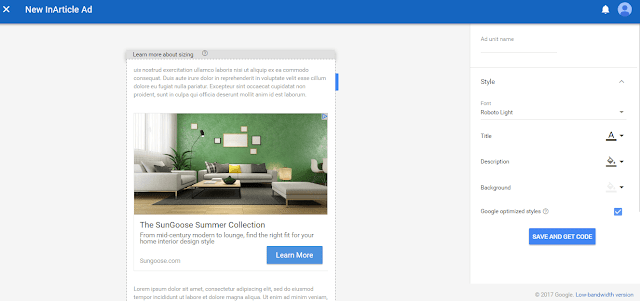
Google InArticle Adsense Native Ads

Many eligible publishers have been making good use of Matched Content. Google is further pushing the limits of this feature by enabling publishers to use the InArticle Ads between content paragraphs. The ad dimension will be a minimum of 250px side and it will show content recommendations for publishers whose website or blog is eligible for Matched Content.
According to AdSense Help Document, InArticle ads only use creatives that have high quality assets (for example, the responsive ads in AdWords). This means that while InArticle ads can be more visually appealing to your visitors, they may have a lower CPM than you’re used to in the short term.
The font, headline, description and background of InArticle ad can be customized to match with the style of the website. You can also let Google recommend styles from which the suitable one can be picked.


Google also promises that high-quality advertiser assets will be available for InArticle ads.

Google InFeed Adsense Native Ads

Feed ads have been around for quite some time now but Google is adding some really fancy features for its InFeed ads. InFeed ads are just similar to InArticle ads when it comes to being native, however, they cannot be auto-optimized by Google. Publishers will have the power to customize the ad according to the needs to their website and monetize website or blog without disrupting the visual flow.
Parts of the ad that can be customized includes headline length, font, wrapping and alignment for text assets (headline, description, URL), button colors and borders, and the padding.

Both of these ad formats are currently available for a limited number of publishers. It is being expected that the ads will be rolled out to the public later this year.
Do you like the new ad formats? Let us know through comments.

Friday, July 14, 2017

How Does Google AdSense Code Work?

It sounds simple; get people to click ads on a Web page and make money. Website owners around the world do that daily using AdSense, a tool that Google makes available to anyone. If you'd like to join the action and make money using AdSense, you'll need to add a short block of code to the pages on your blog or website.

How AdSense Works

AdSense helps advertisers by getting people to visit their websites. For example, when you place AdSense code on one of your Web pages, that code generates ads on your page. When a site visitor clicks an ad, that's one more potential customer for the advertiser -- and for you, the code logs that click and credits your AdSense account. The amount that you make per click varies depending on the advertiser whose ad you display. After the money in your AdSense account reaches a certain threshold, Google sends you a payment. As of January 2013, your payment threshold is $100 if your reporting currency is the U.S. dollar. View a summary of your estimated earnings on your Google Analytics homepage. If you’d like to view detailed information, tap or click the homepage’s "Performance Reports" tab.

Getting Started

You don't have to write code to use AdSense code. After you create an AdSense account, Google gives you a few lines of HTML code that make AdSense work wherever you place the code. If you don’t have an AdSense account, visit the Google AdSense signup page and create a new account (link in Resources). During the signup process, you fill out a page that requests basic information, such as your contact name and your website's URL.

Account Approval

After you submit your application, Google sends an email letting you know if your application made it through a preliminary review process. At that point, you will be provided with the AdSense code to paste on one of your Web pages. Google stresses that it is important to place the Google Analytics code in your Web pages immediately after receiving it; the company will not review your application until you do. You will receive final notification via email.

HTML Basics

Google understands that not all site owners are programmers. If other people created your website and they can't help you add AdSense code to it, visit Google's help site and learn to add the code yourself (link in Resources). HTML is the markup language that people use to create websites and blog pages. People use a variety of tools to edit HTML documents, including text editors such as Notepad and dedicated HTML editors like Dreamweaver.

Adding Code

Google explains several ways to add AdSense code on its help page named, “A few words about HTML Web” (link in Resources). On that page, you will find links named "Using Code View," "Using HTML Insert" and "Using a Content Management System (CMS). Each link takes you to a page that describes how to add AdSense code using a specific type of HTML editor. For instance, if you use a Code View Editor that lets you work with HTML code in its raw form, click the "Using Code View" link to learn how to perform that task.

Considerations

Google has AdSense program policies that you must follow before adding code to your pages. If you fail to adhere to those policies, Google can stop serving ads to your site and disable your AdSense account. For instance, you can't put your ads in emails, software and pop-up windows. You can, however, experiment with placing your ads in different locations on your pages. Once your AdSense code is in place, maximize your chances for success by learning how experts place ads on their pages to maximize revenue.

How to Advertise on Google AdSense

Google AdSense is a program that website owners can use to make money from their websites. The ads the program displays on a website are relevant to the site's content and appeal to certain characteristics of its visitors, making it a useful solution for bringing target traffic to your website. To make your business appear on the AdSense network, first sign up to the advertisers' program, Google AdWords.

1. Open a browser and navigate to the Google AdWords site (link in Resources). Sign in with your Google account or click “Create account” if you do not have one.
2. Click “Billing” from the top menu bar, then click “Billing preferences.” Type in your payment details and VAT information, then click “Billing” again, this time followed by “Make payments.” Type in an amount you want to add to your advertising account, then click “Continue” and approve the payment on the next screen.
3. Click “Campaigns | All online Campaigns | New campaign." Fill in the details of your advertising campaign, including a name, the locations, networks and devices on which you want the ads to be shown, and a budget for your campaign. The amount you pay when a user clicks on of your ads is based on an auction system among advertisers, so choose a starting bid and a daily budget. Start with a low bid of less than a dollar -- you can increase it as necessary later. Click “Save and continue” when done.
4. Create an ad. Type in a name for this ad group -- for example, if you sell video games, you might create a different ad group for each popular platform. Type in a headline, description and destination URL for the ad in the relevant text boxes, then type in keywords for this ad group. These relate to the searches your potential customers make in Google. Generally, the more relevant the keyword, the more effective and expensive it will be. For example, the name of a video game will generally convert better than the name of a character in it, though the latter may probably be cheaper.
5. Type in the maximum you want to bid on these keywords in the “Ad group bids” section. Click “Save ad group” when done. Your ad will go live once approved by Google. You can now create new campaigns and ad groups as required.

Sunday, July 9, 2017

AdSense Now Flags Individual Pages for Policy Violations, No Site-Wide Bans

After the YouTube exodus, Google Display Network is taking great pains to ensure brand-safety for its advertisers, without cutting too deep into publishers’ (and its own) revenue.
Last week, Google announced two updates that will allow it to act quickly and more precisely against prohibited content, all the while making all policies (and their violation penalties) clearer to publishers.

With this launch, we’re moving two steps closer to our goal of making it easier to understand how our policies work so that publishers can drive their businesses forward, using Google ad platforms.
Here’s what the updates are all about, in a nutshell.

Individual Pages to be Flagged Instead of Site-wide Bans

Until now, Google used to pull all ads from websites that were found to be monetizing objectionable content with GDN ads. With this update, Google can be more discerning.
The update uses a combination of algorithms and manual reviews to flag and individual pages that violate content policies while leaving brand-safe content on the same domain to be monetized with ads.
This specific update will give Google AdSense and AdX publishers more room to breathe while responding to violation notices.
Page-level controls would also allow Google to remove ads from bad content more quickly. Before the update, Google would wait for a website to commit multiple violations before taking drastic action such as removing all ads or terminating the publisher’s account.
Now, these enforcement practices will be reserved only for incessant, repeat offenders.
We’ll still use site-level actions but only as needed. And when it’s necessary, such as in the case of egregious or persistent violations, we’ll still terminate publishers. Altogether, this means fewer disruptions for publishers.
— Scott Spencer, director of product management, Google sustainable ads
In the meantime, Google intends to become more transparent about policy communication.

New Policy Center for AdSense Publishers

We’re also announcing a new Policy Center as a one-stop shop for everything a publisher needs to know about policy actions that affect their sites and pages.
Within a few weeks, the new Policy Center will offer AdSense publishers with account-specific help. This will include page-level data on policy violations, subsequent actions Google took across their websites, step-by-step instructions on resolving said issues, and an easier, quicker channel for requesting a review (instead of filling out a Google form) once the publisher has fixed the issues.
Google intends to add these policy centers to more of its publisher platforms by the end of this year, although it’s yet to specify which ones.
While the updates are in the best interests of publishers, their effectiveness in curbing monetization of prohibited content and assuring brand-safety for advertisers remains to be seen.
Google has quantified and purged bad ads from its Display Network before, but it hasn’t yet estimated the number of content pages that will be affected by this particular update.
Google has ramped up policies, enforcement practices, and advertiser control since Times Inc. reported brand adverts playing next to derogatory and hateful content on YouTube.
After a flurry of new advertiser controls and policy updates, YouTube content creators were left complaining about unfair penalties and vague policies. The policy center is not yet available for YouTube, but it’s definitely a step towards making GDN more transparent for publishers.

Saturday, April 15, 2017

How Does AdSense Work?

Whether you’ve been blogging for five minutes or five years, monetizing is one of those topics that almost always comes up. Should I try to make money from blogging? Can people really make a living online? How should I try to make money from my blog?
Google AdSense is one of the most common ways to monetize, though I’ll warn you now: AdSense is NOT a get rich quick scheme. In fact, it can take a long time to make more than a few pennies. But it can also pay off big in the long run.

What is AdSense?

AdSense is a program that allows bloggers and website owners to make money by displaying Google ads. You’ve probably seen the ads all over the place, including in Google search results. Basically, Google gets the largest cut and you get a small percentage. There are two ways to make money from AdSense:
  • Impressions – this is based on the number of page views of pages or posts with ads
  • Clicks – this is based on how many people click on the ads (don’t EVER click your own – more on this later)
To make it as basic as possible, you sign up for an AdSense account and add the code to your blog or website. You can choose how your ads look, where they show up, and even what kind of ads you’ll accept. Once you get to a minimum threshold of $100, Google will either send you a paper check or make a direct deposit into your bank account.

Who’s Eligible?

If you use Blogger, you can use the Monetize tab to set up and manage an AdSense account.
If you use self-hosted WordPress, you can visit the AdSense website and apply for an account. You’ll receive a code that you can place wherever you’d like, or you can use a plugin to help with placement.
*If you use free WordPress, you cannot use AdSense, but you can use WordAds if you have your own custom domain. (Just another reason why self-hosted WordPress is better.)

How Much Can I Make?

As I told you before, you will not get rich quick using AdSense. It took me 9 months to make $2 (yes, two dollars) on my personal blog. However, I made $81 last month. That’s still pathetic compared to many blogs – some people can earn a full-time income from AdSense alone. But it takes a LONG time to get there, and you have to have a ton of traffic.
Some ads are worth more money per click than others. This is also affected by the amount of traffic you get, the keywords the person searched for, the percentage of visitors who click on a particular ad, etc. There are a LOT of factors that determine how much you’ll make, but a rule of thumb is that newer blogs simply won’t make as much money.
My personal blog is about 14 months old. Some days, I don’t get any ad clicks at all and I might still make 10 cents or so just from impressions. Sometimes every click is worth $2 or more. Yesterday the clicks were worth a whopping 26 cents each.
Many people get impatient when they’ve had the code up for a month or two and haven’t made more than a few pennies. If you’re looking for something that will pay TODAY, AdSense may not be for you. And to be honest, I don’t know of anything instant – if I did, you can bet I’d be using it!

How Can I Make More from AdSense?

Basically, your best bet for ad clicks is increasing your search traffic. When people are trying to solve a problem, they usually turn to search engines like Google or Bing. If you have a post that solves that problem, using SEO will help your post rank well in search results. SEO will also help AdSense serve up relevant ads, so when people click on your blog post, the ads may answer the exact question they’re asking. Result? Ad clicks!
Here’s an example. Let’s say I write a post about the health risks of liposuction. I use SEO techniques to help Google realize what my post is about, and my post is the third one when someone searches for “liposuction risks.” AdSense also knows what my post is about, so people reading my post will see an ad that might say something like, “Safe liposuction services in New Hampshire” (or wherever).
If the person is interested in finding the safest place for liposuction, s/he is likely to click that ad. As I said before, the rate per click depends on a lot of factors, but my concern is making sure that people read MY post and not others! If they go to another blog to read about liposuction risks, they’re possibly clicking that person’s ads instead of mine.

IMPORTANT!

There are a few things you need to know about AdSense before you ever put the code on your blog.
1. Never, ever click your own ads. In case you aren’t aware, Google pretty much knows everything. And they can tell if you’re clicking your own ads. It’s very tempting to click about 50 times and make some money, but all it will do is result in being banned.
2. Never, ever encourage friends or family to click your ads. Same as above. You can and will be banned from AdSense, and don’t ever think Google won’t figure it out. I don’t know how they do it, but I have seen it happen to people I know. JUST DON’T.
3. Pay attention to your ad clicks. If you average 2 clicks a month and you suddenly get 100 in a day, chances are that something is wrong. If you’ve pissed someone off and they decide to fight back by clicking all over the place, you can get banned even though you didn’t do anything.
4. Never rely on AdSense as your sole income source. Even if you get really good at SEO and you have 100 websites making thousands of dollars each month in AdSense, you never know when something could happen to trigger Google’s no-no sensors. You can make good money with AdSense, but you should also use other monetization strategies just in case.
5. Don’t use more than 3 ad blocks on a single page. Google allows up to 3 ad blocks on a page. So if you have one in your header, one in your sidebar, and one at the end of your post, that’s the limit for that page. Also, don’t plaster ads all over the place and annoy your regular readers! There are ways to implement the ads without making your site ugly.

What Questions Do You Have?

It’s impossible to cover a topic as broad as AdSense in a single post. This overview gives you an idea of what it’s for and how it works, but it still may not answer enough questions to make sense for you.
Let me know what would be most helpful. Do you want screenshots and step-by-step instructions on inserting the code? More tips on how to improve your earnings? A breakdown of all the acronyms you see in your AdSense account, like CPC, RPM, and CTR? Leave your questions in the comments and I’ll address them in future posts.

Friday, April 7, 2017

Google’s Warning to Affiliate Publisher Sites

Over the years, search engines have gotten smarter. While initially simple keyword saturation (using the same keyword many times) worked, now this is not the case. Many sites instead will use “affiliate programs.” Google’s official webmaster blog posted a warning on on January 27, 2014 against this new method to bypass the search engine originality check. Note that website affiliate programs are actually an added bonus in terms of monetization of websites. However, if you do not follow the requirements by Google quality guidelines, you may find yourself at a distinct marketing disadvantage.
What is an affiliate program and how does it affect publishers?
Quite simply put, it is a syndicated feed of content that is provided by external sources. It is a very cheap way to rack up many articles on a domain at once, which may sound appealing at first. This used to work for website optimization until recently, when Google decided to crack down on the practice. Why is it harmful to search integrity? These affiliate programs can saturate Google for specific keywords. This means that anyone using Google is more likely to find the same article many times over while searching for something specific without getting any original or unique content. This is bad for consumers, as no new information gets shared, and it’s bad for original publishers because their articles go completely unnoticed.
Is there any added value?
Google asked webmasters to pose the question “Is there any added value?” before publishing a syndicated feed. For example, if you were to publish an article that was already on a news site, you would have to add some analysis to the article in order for it to not to fall under Google’s definition of “affiliate programs”. This category is now specifically outlawed according to Google’s quality guidelines. This means that affiliate networks can now be considered counter-productive. Rather than being simply a nuisance that searchers and publishers alike have to put up with, they can now be removed completely from Google if they are found to be in violation of these guidelines. In short, webmasters should take heed and ensure that their content is high quality, original, and useful.
Bottom Line
Remember the Panda Update in 2012? It will definitely hit low-quality affiliate publisher sites that add no content value. Image credit: mastergoogle.com
Google is now cleaning up these webpages by ranking them into different categories such as Thin Affiliation, Spam, Junk, and so forth. The common denominator among these labels is that the web page’s contents are not at all useful to end-users. The trick to avoid any of these adverse rankings isn’t a trick at all — just continue creating fresh, quality content. With that, you can never go wrong.